



AI Autopilot for Ansys Mechanical
The Fovus Workbench extension submits, benchmarks, and optimizes every Mechanical solve from a native toolbar inside Workbench — no CLI, no manual export, no guessing at instance types.
The challenges
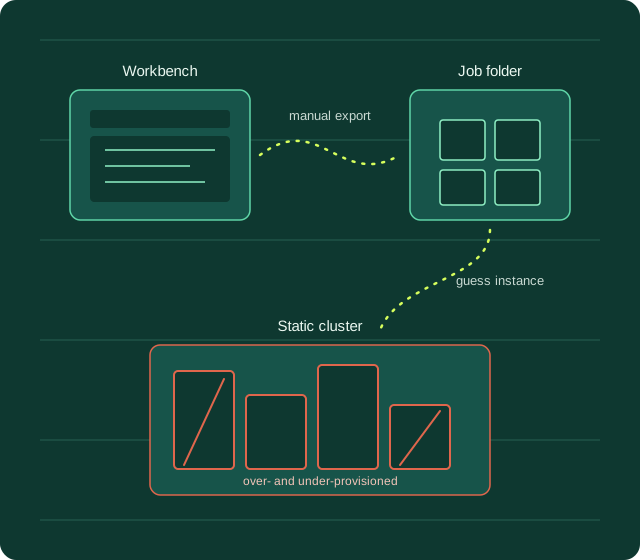
Every Ansys Mechanical solve means leaving Workbench to write the input deck, upload it to a cluster or cloud console, guess at an EC2 instance size for that specific analysis type, and babysit the job until it finishes — then repeat the whole loop for the next design iteration. A modal run and a large nonlinear transient study get the same static hardware profile, so lightweight jobs sit on oversized instances while demanding ones stall or fail on undersized ones. The manual round-trip between Workbench and separate infrastructure tooling adds hours per job before the solver even starts, and it’s the analyst — not the compute — that becomes the bottleneck.
How we help

A native Fovus toolbar in the Project Schematic drives Mechanical in batch to export the solver input deck, stage it, and upload it — no Write Input File, no manual job folder upload, ever.

Fovus’s AI optimization engine reads each submission’s solver profile and assigns the AWS instance type, storage, and Spot/On-Demand strategy proven fastest and cheapest for that analysis — not a static config reused for every job.

Point the extension at a job config exported from the Fovus web app and it becomes your default template — environment, constraints, and optimization objective are locked in, so every future submit reuses them automatically.

Check Status, Download Results, Cancel Job, and Open in Fovus Web all work off the recorded job history in the toolbar — track and manage a solve without switching windows or hunting for a job ID.

Fovus applies its checkpointing and Spot-to-Spot failover under the hood, so long nonlinear and transient solves can run on Spot pricing without the risk of losing hours of compute to an interruption.

Region, spend, and optimization-scope constraints set in your Fovus job config are enforced automatically at the infrastructure layer — every job submitted from Workbench stays inside the boundaries you define.
The numbers behind the Autopilot
What Ansys Mechanical teams see running on Fovus and AWS
70%+
Lower compute cost vs. a single static configuration applied across every analysis type.
100x
Faster time-to-insight vs. manually-sized, manually-managed HPC infrastructure.
6
Toolbar buttons cover submit, status, results, cancel, web console, and history — the entire job lifecycle.
1-click
From Workbench toolbar to a fully governed AWS HPC job — inside your team’s existing config, region, and spend guardrails.
Business Impact
Engineering teams running Ansys Mechanical on Fovus are cutting cloud HPC spend by 70%+ and getting to results up to 100x faster than static, manually-provisioned clusters — without asking analysts to learn a CLI, write a config, or leave the Workbench window they already live in.
Your next solve could be next.

1/1